📌 What is ESPHome and how to install.
ESPHome is a system that makes it easy to create smart devices based on an ESP8266 or ESP32. You don’t need to write complicated code — just create a YAML file describing what the device should do.
Why install ESPHome with Docker?
Docker makes ESPHome super easy to install. When combined with a graphical interface like Portainer, CasaOS, Unraid or OpenMediaVault, you can deploy ESPHome with just a few clicks — perfect for beginners and advanced users who want a clean setup.
REQUIREMENTS
- Docker installed
You need Docker running on your server, NAS, Pi, or mini-PC. - GUI interface
Portainer, CasaOS App Store, or any Docker GUI environment works. - ESPHome image
Your system will download the latest official Docker image automatically.
Step-by-step: Install ESPHome using a GUI
1. Open Portainer (or your GUI)
Log in to Portainer, CasaOS, or another Docker interface. Go to Containers → Add Container.
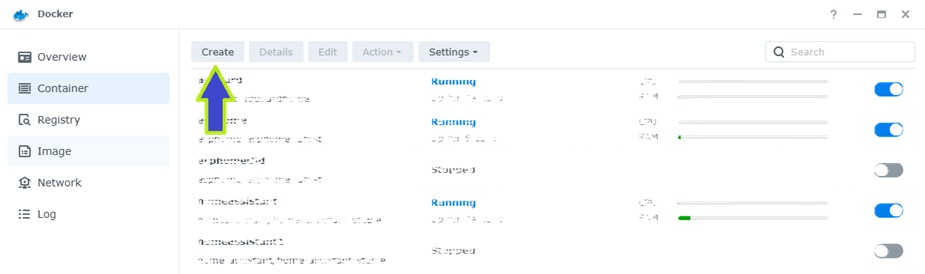
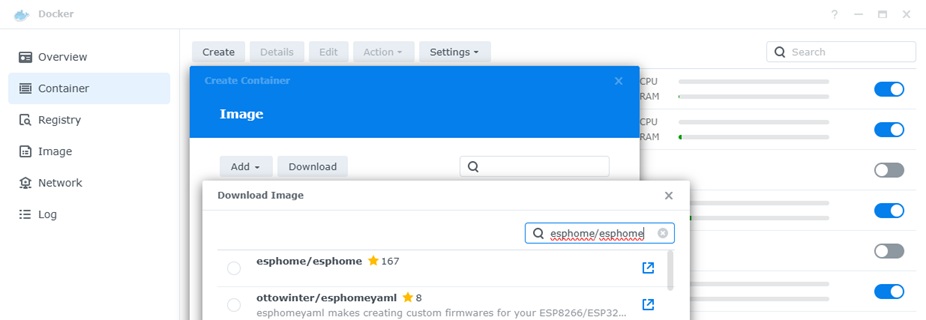
2. Create a new container with image esphome/esphome:latest
Press download
In the search field, enter:
esphome/esphomeSelect and press download
Sellect again esphome/esphome:latest and go Next
3. Configure the container
Add these settings (you can click “Add Environment Variable” or “Add Volume” in your GUI):
Volumes:
- /config → A local folder where your ESPHome configs will be stored
Ports:
- 6052:6052 → ESPHome Dashboard
Restart policy:
- Always (recommended)
4. Deploy the container
Click Deploy or Create. Portainer/CasaOS will download ESPHome automatically and start it.
5. Visit the ESPHome dashboard
Open your browser and go to:
http://YOUR-IP:6052You now have the full ESPHome Dashboard running, ready to flash your first device.
Tips
- Use a persistent config folder so your devices stay saved after an update.
- Enable the API in each ESPHome project to auto-integrate with Home Assistant.
- If you update the Docker image later, your configs stay safe.