Climate Control Project with OTA
Project Overview
This project shows how to control a DHT22 via ESPHome with OTA updates. You can integrate it with Home Assistant.
Step-by-Step Guide
- Wire the AM2302(dht) to your ESP32/ESP8266 board.
- Upload the ESPHome YAML configuration with OTA enabled.
- Add the device to Home Assistant for remote control.
- Test relay control and OTA updates.
Build hardware
First we wire the hardware, in this case we use a WEMOS D1-mini with a DHT22
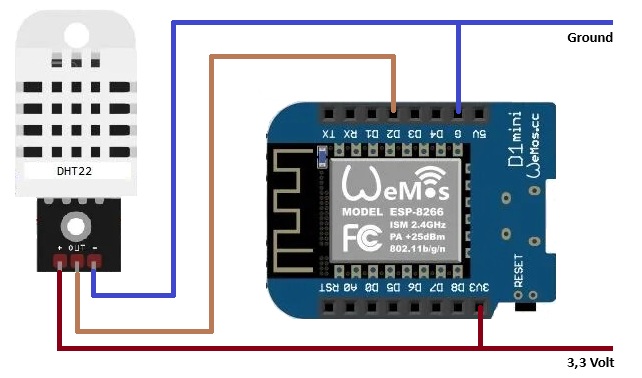
ESPHome YAML
esphome:
  name: livingroom_sensor
  platform: ESP8266
  board: d1_mini

wifi:
  ssid: "MyWiFi"
  password: "MyPassword"

sensor:
  - platform: dht
    pin: D2
    model: DHT22
    temperature:
      name: ""Living Room Temperature"
    humidity:
      name: "Living Room Humidity"
    update_interval: 10s
Breakdown:
- esphome: Defines the device name, platform, and board type.
- wifi: Your WiFi SSID and password for network connection.
- ota: Enables Over-The-Air updates for easy code deployment.
- sensor: Configures a GPIO pin to control a DHT22, you can see outcome in Home Assistant.
wifi:
  ssid: !secret wifi_ssid
  password: !secret wifi_password
  min_auth_mode: WPA2
WiFi Configuration Explained:
- ssid: The name of your WiFi network, stored securely in the
secrets.yamlfile. - password: The password for your WiFi network, also stored in
secrets.yaml. - min_auth_mode: Sets the minimum authentication mode; WPA2 is recommended for security.
Using !secret keeps your sensitive WiFi credentials out of the main configuration file, which is a best practice for ESPHome projects.
sensor:
  - platform: dht
    pin: D2
    model: DHT22
    temperature:
      name: ""Living Room Temperature"
    humidity:
      name: "Living Room Humidity"
    update_interval: 10s
What each line means:
- platform: dht – Uses the DHT sensor platform.
- pin: D4 – The GPIO pin where the sensor's data pin is connected.
- model: DHT22 – Specifies the sensor type (DHT22 / AM2302).
- temperature → name – The name that appears in Home Assistant.
- humidity → name – The humidity reading name in Home Assistant.
- update_interval: 10s – Reads the sensor every 10 seconds.
Ad Space 728x90